maandag 15 april 2019

Iphone 6s battery problems

So I bought an iPhone 6s back in October 2015 and it has been serving me well for more than 3 years. Performance wise it is still excellent even by 2019 standards. The main thing troubling me was battery performance, battery life and lifespan. So I back in 2016 in noticed my phone would start to randomly shut down even though it indicated plenty of charge percentage wise. 20%? 30% 34%? it didn't matter, it would randomly shut down. The reverse was frustratingly also true, 1% charge and... nothing happened, you could happily watch another half hour of video without having it shut down.
Fast forward to december 2016 and Apple had a recall program for my model 6s. Great! (see ifixit for a great overview of all the battery issues). And I started 2017 with a fresh battery and all was great.


Until 2019 and the shutdowns, the unreliability and the frustration started again. The new battery health tool indicated 82%. this was not what I was experiencing phone life was not down from 15h to 12h a day it was a matter of hours. I would open up my phone only to see up to 20% of the battery capacity be blasted off in one moment. I would charge the phone up to 3 times a day. Needless to say I replaced my battery again. So let's see what happens, I should be good till 2021.


Summary

2015-10: new iPhone 6s
2017-01: 1st battery replacement
2019-04: 2nd battery replacement (82% lifespan)

maandag 5 december 2016

My Iphone won't charge!

 Summary

  •  Plug in your Iphone to your USB port of your computer
  •  Restart your computer, your iPhone should boot up 
  • If not start Itunes, your iPhone should boot up 
  • If not read on further and check out the links

Story

So your iPhone battery went dead and it drained completely. No Big deal you say to yourself i've got my trusty charger. *plug* jup, iphone is connected the red battery is on the screen and the connector in the bottom of the screen is gone indicating that the phone recognized the charger. Then you wait... and you wait some more. This is strange you say to yourself and if you are an engineer the googling begins...

I started with this article from David Payette:
http://www.payetteforward.com/my-iphone-wont-charge-heres-the-real-reason-why/

Looks like solid information but no luck so far me. Hard reset? no

Then this one OSX daily:
http://osxdaily.com/2016/02/20/iphone-wont-charge-heres-why-fix/

Different chargers? no luck 

Then I remembered coming across an article mentioning restarting your computer with the iphone connected. And Yes it worked!

Some time later it happened and starting iTunes helped booting up the iPhone after it went completely dead.

I tried this on a iPhone 5s, an iPhone 6s and an iPhone 4 and iPhone 4s

vrijdag 8 juli 2016

Tegellijm van betonvloer verwijderen

Bij de renovatie van de keuken moest ook de oude tegelvloer verwijderd worden. De tegels zelf waren geen probleem, een beitel en een hamer en ze kwamen zo los. Wat ze achterlieten was een ander verhaal. De tegels lieten 8 m2 vol tegellijm achter met van die mooie kamstrepen. Aangezien de ondergrond egaal moest zijn voor de nieuwe vloer zat er niets anders op dan de tegellijm eruit bikken.

Poging 1: 

oude platte schroeven draaier en hamer
kosten: *
effectivieit: *
ok de tegellijm vliegt er nou niet bepaald af en 8 m2 is toch wel heel veel als je zo'n ministukje per keer eraf haalt. .

Poging 2:

Pneumatisch boor op beitel stand
kosten: **
effectiviteit: **
heel lastig om hiermee egaal alle lijm weg te krijgen

Poging 3: 

Brede handbeitel en zware hamer
kosten: **
effectivieit: ***
Dit ging al beter, er komen daadwerkelijk stukjes lijm af. Helaas werkt dit alleen als je mooie riggeltjes tegellijm hebt. Zo gauw je op een massief stuk tegellijm komt schiet je beitel eroverheen. Het effect? de vloer is niet echt egaal te noemen

Poging 4:

Beton schuurmachine
kosten: ***+**
effecitiviteit: *****
Wat een topding, deze machine ziet eruit als een haakse slijper, maar dan met tand aan de platte zijde van de schijf. Hiermee schuur je gewoon de volledige lijmlaag weg top op het beton. Het nadeel? Stof, heel veel stof. Dus naast het huren van dit apparaat ben je ook nog de kosten kwijt voor het huren van een bouw stofzuiger. Deze heb je echt nodig, er komt zo'n berg stof bij vrij als je dat met je huis tuin en keuken apparaat doet is die binnen de kortste keren overleden (ervaring).

Andere optie:
- Egaline smeren en een nieuwe toplaag creeeren

dinsdag 29 maart 2016

Thoughts on iOS, Android and Windows phone

I am happily using the iOS devices for the past years. I stepped in when the iPhone 4 came and so far nothing has given me a reason to step out of the iOS ecosystem. I have an android tablet (Asus TF300) and that was quite underwhelming experience.

Back when i bought it the quad-core nVidia Tegra 3 chip looked great on paper and in the benchmarks, but actual performance in day to day usage was just nuisance. It was sluggish, things would take forever to load and simple things like browsing and typing in a web-page would be a chore as the tablet would hack and cough its way through the ordeal. I still have the tablet and use it occasionally, but my expectations of the experience are already quite low. To be fair after 3 years my iPhone 4 was also lagging like crazy, but the android tablet did this out of the box.

I have never owned a modern Windows mobile phone, I owned a HTC s710e back in the day, it had windows mobile 6.0. The experience frustrated me so much, it was bad at everything it was supposed to do. It was a horrible as a phone, seriously you could not pick up calls or call anyone without the OS glitching in some way. It was horrible at being a PDA, you could not get alarms to function correctly without tweaking the registry. It was hugely underpowered in CPU and RAM and would freeze up constantly. The thing is I wanted to love this phone so bad because I liked the form factor and the functionality, when it actually worked. I ended overclocking the phone and bricking it within 9 months of purchase. Thoroughly cured of my desire for smartphones I got a samsung G600 and what a relief. It just worked ;)

A few of my colleagues have Windows phone devices and to my surprise I find it quite appealing. All transitions are smooth and slick. The always on screen with time display is a nice touch. The tiles look orderly. So I wonder will it ever entice me to go back?

maandag 21 december 2015

Samsung 850 EVO SSD Windows 10 flickering redraw issue

So I got myself a brand new SSD to upgrade my ASUS x750 Laptop. I cloned the HDD using the samsung Data Migration App, all fine and dandy.

Asus x750 headaches

Unfortunatly this laptop is the most impractical laptop to upgrade I have ever seen. After removing all the bottom screws, it actually opens from the top and practically nothing is accessible without removing 40+ screws and disconnecting every cable to the motherboard. And then removing the motherboard. Check youtube for a detailed opening video, you need it. Then when finally the SSD is fully seated and the other HDD plugged in the secondary HDD slot. The ordeal is over right? No, it never is that easy...

Loading from the SSD the first

Restructered the boot options in the Bios, SSD shows up, yes, check

so far so good

user logon, check yes enter credentials, logging in here we go...

hmmm why is my screen constantly redrawing? arg it keeps flickering. what is up with windows 10!

rebooted from the HDD, all is well. So that rules out any other hardware issue, it must be the ssd...

After a long fruitless internet search decided to clone the disk again and this time first disable the HDD in the Bios, and what do you know it started with no flickering. Restarted and enabled the disk again and... no flickering! I am a genius.

Summary

- Clone disk
- Make sure SSD is the only visible disk for the laptop
- Boot up from SSD
- Enable/mount old HDD
- Enjoy high speed OS on SSD steroids

(As far as I could deduce the flickering issue came from loading up both the original HDD and cloned SSD. The old HDD got the adress C:\ and SSD something like H:\, then some conflict with the user information data (C:\users) caused the information to redrawn constantly on screen. This was impossible to change easily in the current configuration so I had to reclone the disk afresh)

zondag 16 augustus 2015

Upgrading to windows 10 from 8.1 on an Asus R750 and X750

Introduction 

So I installed Windows 10 on my Asus R750/X750 after cautiously waiting a few weeks and keeping an eye out for bad experiences from other users. This Saturday I decided to take the plunge and click "upgrade" and my laptop did not explode... yet.

The Upgrade

Starting the upgrade from windows 8.1 to windows 10 was a pain-free experience. The update wizzard was quite brief and seemed to know what it was doing. I don't exactly know how long it took as it ran overnight and in the morning I had a nice Windows 10 login screen to greet me. So far so good.

Then I noticed something strange, the touch pad was not working. Apparetly this has got something to do with the Asus Smart Gesture application and the "Elan Touchpad driver" that windows update automatically installs. Check out this link for the solution that worked for me:
http://ivanrf.com/en/asus-smart-gesture-and-windows-10/
 After following the steps and rebooting a couple of times, Win 10 plays nice with my touchpad is ready to go.

The first impression 

My first impression of Windows 10 is generally positive. All my apps from windows 8.1 got transferred well, my files are where I left them and even my Desktop is just as clutery as I left it. It felt a bit like repainting the house, it feels new but the stuff shows you it is the same place.

Small irritations popped up with dealing with the settings as they are still in two places, the control panel and the "settings". At least it is not as hidden as in windows 8 but still, why?

Another irritation is that the touchpad does not play nice with all windows 10 features. Take the new Edge browser, two finger scrolling? no that's not allowed, oh well, back to FireFox.

All in all I think Win 10 is step in the right direction, but I would'nt be surprised by a Win 10.1 in a few months...


donderdag 29 mei 2014

Materiaalkune 1 on OCW Delft lesson 2

Materiaalkunde 1 on OCW Delft lesson 2 

In this lesson I learned more on the properties of materials. One specific property that stood out for me was Dielectric strength. Other topics were the classification of materials in families and counting with logarithms. 


Material properties 

As mentioned dielectric strength stood out for me as it is a property to which I don't have an intuitive grasp. The guy in the lecture defined it as follows: 
"The dielectric strength of a material is a measure of how much a material will interact with electromagnetic waves"
And he had this picture on. But what does it mean?! So the radar sphere has a low dielectric response and the ships beam has a high response thereby making it visible on the radar? I think so, so basically high dielectric response indicates that a material will interact with electro magenetic waves, like the definition said... right
uh.. what?
To grasp this subject I first tried Khan academy which has a really good lesson on this. Other websites that were helpfull to me were:
 and this websites has some interesting information on dielectricity: http://en.wikipedia.org/wiki/Permittivity.

σ/(ωε’)Current conductionField propagation
0perfect dielectric
lossless medium
≪ 1low-conductivity material
poor conductor
low-loss medium
good dielectric
≈ 1lossy conducting materiallossy propagation medium
≫ 1high-conductivity material
good conductor
high-loss medium
poor dielectric
perfect conductor

This is already very helpfull in my day to day work. Getting a more intuitive grasp of dielectrics also gave me a better grasp of capacitance. A dieelectric is an intergral part of a capacitor. As a dielectric material increases the capacitance rating of a conductor. 


Classification of materials 

A helpfull and quite intuitive section of this lesson was the classification of materials. Basically it helps me group materials by family. For this classification to be really helpfull it would be good to know what the basic properties of each material family is.


dinsdag 6 mei 2014

Material science 101

Being my inquisitive self, I have decided I would like to learn how the Finite Element analysis actually works. However having studied biomedical engineering this was not an obvious subject and I do not have the necessary background information to grasp it. So what do you do? 

I just finished the first lecture and what stuck was the following. I liked the part of putting energy usage in perspective. That we as dutch citizens have on average about 6 kW/s working for us compared to ~2 kW/s for the average world dweller is quite a difference.
Everyday energy costs, note the amount of energy it takes to power a house/car 
Moving on to the actual material science part of the lecture. I learned the basic properties of materials. Which you know by experience but I need to find how to get an intuitive grasp of these concepts. Take Elastic modulus for example... what does that mean, which materials have a high/ low Emod? high would be steel and low would be plastics... meaning... meaning... meaning... meaning that steel is harder to bend than plastics, right? correct me if I am wrong. 

The picture below helps kind off to make sense of these properties: 


All in all an interesting lecture and I am determined to follow at least 3 more lectures. The key to happiness is to set low expectations  :P 

maandag 13 augustus 2012

An all in one Macro - Excel Macro beginner

If you have to use excel a lot to create graphs and figures chances are that you have thought to yourself: ‘There has to be a way to automate this…’. And if you’re like me and know your way around Microsoft Office, you have the developer tab enabled and you’ve seen that button record Macro.image
“Ha! my tiresome repetitive tasks are over!” you think to yourself, but if you’re not used to programming in VBA, watch out! here is a pitfall I ran into so you don’t have to:

Trying to do everything in one Macro:

Macro’s so powerful, they can do everything you want. The problem is they need to be told exactly what to do and as a beginner you don’t know the language. (Try asking for directions in French for example and see if you understand the answer). So you have all this power under your fingertips, but no way to (quickly) use it. What I learned as a superficial Macro user is not to try everything in 1 Macro.
For example I had 10 sheets of raw data formatted exactly the same but needed to be set up differently and I wanted a graph plotted of each sheet. Trying to do that all at once resulted in a graph I couldn’t use and a Macro that was so specific it couldn’t be used for other sheets unless I did some serious tweaking. Which I did have the time nor experience for. So I went for the next best thing:
  1. Record a Macro of moving the raw data in the correct format
  2. Create a graph manually
  3. Record a Macro of adding all the titles and getting the correct formatting
This took me 5 minutes to set up and saved me 20. While trying to figure out how VBA took me 2 hours and it still doesn’t work.
So hope this helps you Macro beginners out there.

maandag 19 maart 2012

IOS 5.1 Improves responsiveness of the iPhone 4

I have my iphone 4 for almost one and a half years and it was starting to get sluggish. It was running on IOS 5.0. This resulted in long load times for the camera app and even jittery transition effects when changing homescreen pages. Now I have the 16 GB model and I thought it was due to it being almost filled to the brim with apps and music. But after freeing up 2 gigs it still had the same issues. Now I just upgraded to IOS 5.1 and everything works a smooth as it was in the beginning and even my camera app launches in about 2 seconds.

Bottomline: I like the IOS 5.1 upgrade!

zaterdag 18 februari 2012

Silencing the Smoby “Be Fun” push trike

In my first post on the Smoby Be Fun Trike I wrote that it is generally a good bargain priced tricycle with a handy push rod. The drawback however was that it was seriously noisy. In my second post I did some good ol’ problem analysis and thought of some ways to solve it. So in this final installment, my solution.

First on what do you need:

  • Smoby Be Fun Trike
  • An (old) inner tube of a bicycle tyre.
  • Scissors
  • Ducktape

Seriously that’s all

Noise solution smoby be fun trike 1

So what we are going to do is tape the bicycle tire tube to the wheels of the trike.  You start with measuring the circumference of the 3 wheels and cut the old bicycle tyre in according length. Then tape the pieces of tire tube to wheels using your trusty duck tape and there you have it a whopping 15 db noise reduction (remember that every 3 db the sound level is doubled).

There you have it, a simple solution to an annoying problem and one that can be done in 30 minutes with your basic household inventory. Enjoy!

Note: The picture shows my first solution using only ducktape. This worked for a while but after a few weeks of driving, the tape lost its dampening power. So I decided to add the tube for higher durability and increased noise reduction

donderdag 16 februari 2012

Daniel Daniel – Elly en Rikkert

Na een korte google actie kon ik de akkoorden van dit bekende kinderliedje niet vinden dus bij deze zelf uitgevogeld:

In “G”

Refrein:

G         C
Daniël, Daniël

G  
vertrouw op God,

      D
Hij hoort je wel (2x)


Em           D               C                 G
Als je in de kuil van de leeuwen ligt,

Em               D                    C           G
snoert Hij de muil van de leeuwen dicht.

    D
Al zien ze geel en groen,

D
ze kunnen je niets doen.

(Refrein)
Hoor je ze grommen, ze kijken zo woest,
hun tanden zijn al jaren niet gepoetst.
Ze lusten je wel rauw,
maar God beloont je trouw.

(Refrein)
Soms wordt er vreeslijk op me geknord,
lijkt het of ik opgegeten word,
zit ik in het nauw dan denk ik weer aan jou.
(Refrein)
Tekst en muziek: Elly en Rikkert Zuiderveld

Tags:

Elly en Rikkert, Chords, Akkoorden, hoe speel je, Daniel daniel, kinderliedjes, Christelijk,

dinsdag 16 augustus 2011

The smoby trike adventure part 2 – Finding the solution

In my last post on the smoby trike I bought for my son, I shared what horribly loud it was and what to do with it. It also talked about finding the root cause of the noise and what to do about it. The main noise factors are indeed the bucket and the wheels. So how do we get the noise down? Well let’s put our thinking caps on first: Sound, what is sound? Vibrations in the air. Our ears pick these up and they turn it into a signal that our brain recognizes as sounds. To put it simple:
Air (vibration) –> Ears –> Bain (Sound)
So these are our options, we can tweak our ears, our brain or the air. Sounds tempting to do something about our brain doesn’t it :)? But to do something about the vibrating air before it reaches our ears and is the more pragmatic and practical goal for some household hacking on the trike.
Let’s use another tool to generate some ideas about reducing the noise. It’s called a morphological scheme. Here’s how it works: you take a goal (make air vibrate less) and doodle what could help reach that goal with no concern for reality or feasibility. Here’s mine:
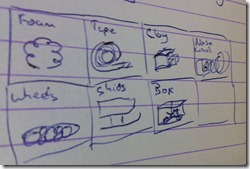
morphological scheme smoby trike
Now this is just to get the creative juices running to see broaden your scope. I can imagine my handwriting being illegible on the picture so here’s what I thought of: foam , tape, clay, noise cancellation, wheels, skids, box.
Now we have multiple solutions and tighten our scope and start to define our limits. For example
1. Price - Under 10 euro solution
2. Effect – It has to work
3. Endurance – has to withstand daily use

The solution?

Noise cancelation would be a cool idea to experiment with, you know add speakers in the wheels that try to cancel out the sound waves that are being generated. But alas to expensive/time consuming. Building a noise isolating box around the tricycle would work but make the trike rather unusable. And spraying foam around the wheels would help just until the wheels have turned one circle, and all the foam is left on the road, I think the same goes for clay. Changing the current wheels with skids or another will increase the complexity and cost. So I’m left with… Tape. The wrap up will be in a next post.

vrijdag 12 augustus 2011

My personal acoustic guitar buying guide, Introduction

Introduction

I recently purchased my third guitar over a time period of 7 years.
Guitars 400px
I started out with a classical nylon stringed Yamaha c-70 I got for my birthday. This got me learning guitar, thank you yamaha. After 4 years I switched over to a steel string Epiphone EJ-200 super Jumbo model. I just loved the sound and the looks. Getting the EJ really improved my playing because every song I played sounded new to my ears compared to my old guitar. After another 3 years it was time for a new guitar. Although I loved me EJ and I got attached to it, the sound couldn’t compare with an all solid guitar and because I could get a good price for it… I traded it in for an Eastman AC320CE which is a dreadnaught model. It did not have the flair of the EJ and I don’t like the looks of a dreadnaught much, but the sound was unbeatable. And that is first and most important thing about buying a guitar. Use your ears, they don’t lie and only they can tell you what the best sound for you is. And what is the point in buying an instrument that you don’t like the sound of?
I’ll end this section with a quote from Justin referring to scales over at justinguitar.com (amazing site by the way!):
If it sounds good, it is good
If it sounds bad, it is bad

The pointers

1. Use your ears
Your ears are two very complex high quality receivers. They will tell you more than a brand or price tag. Before I bought my EJ all guitars would tend to sound alike. So I went to the store multiple times and let my ears get used to the different sounds that guitars have. And by doing that I developed a liking for certain sounds and without a doubt the EJ-200 had the right sound for the right price for me.
That’s it for now. In my next post I’ll be looking into form factor and woods

woensdag 10 augustus 2011

The speed of sound on the dell E5410

I'm amazed.

Here I am with my Dell Latitude E5410 laptop with an intel i5 processor and 4 gigs of ram running windows 7. And here comes the amazing part, Windows Media player/Itunes has a hard time playing mp3's fluently. Almost at random it stutters in playback and this off course really annoying. Almost random because it does sometimes seem to correlate with dragging your windows across the screen. But still with a wopping duo-2.5 ghz at your disposal I'd think the CPU should be able to handle this...

A work around that has some succes is to increase the cpu priority setting in the taskmanager manually to realtime. This is less than ideal since you have to do this everytime you restart the program. See screenshot: image

Any thoughts anyone?

zaterdag 7 mei 2011

The smoby be fun trike review

We just bought a cool tricycle for Timothy, a Smoby - "be fun trike" (what kind of name is that?).He loves it and is happy with it, check out the how he even bought flowers for mommy on his second ride, awwww. 


Anyway cool features why we bought it:
  • Lockable front wheel 
  • Pedals can turn freely or power the front wheel 
  • A push bar 
  • Adjustable seating 
  • Price :) about 30 eur

What did you say?
So far the good stuff, now comes one of the major cons... it noisy! Using my highly effective and trustworthy iPhone decibell app it maxed out at 84 dB and on average it was around 80 dB. To put it in perspective, sitting in a room quietly listening to music is around 55 dB. Ok so maybe that's not the best example since one person's quiet music is not the other. Well according to this website: noisy website, it's about the noise level of a diesel train traveling 60 km/h at a 30 meter distance. Now that's usually no problems outdoors, but you do get a lot of looks, and you hear it all the time. So this looks like a great project for household tweaking. So to approach it scientifically we have our problem description:

Problem description
Smoby be fun trike has a >80 dB noise level while moving on the side-walk 

Hypothesis
Given that all 3 tyres are made out of hardplastic and there is no suspension what so ever, these are problably the biggest noise makers. Then again there is this cool bucket at the back that can be used to lug things around. This bucket is directly connected to the rear wheel base causing it to pick up all the vibrations of the wheels and amplifying it with its big spherical surface. 
H1 - The hard plastic tyres are the main noise makers 
H2 - The bucket at the back is the second biggest noise maker 

Goal 
Get the noise level down by 10 dB

Solution
Ideas anyone?

dinsdag 26 april 2011

Aero Snap

At my work i'm using a windows 7 laptop and was really enjoying the automatic resizing app. What it does? It automatically resizes windows in 3 different flavours:
If you drag it to either the left or the right your window will resize to exactly half of the screen width on either your left of right half. If you drag it to the top, it will automatically full screen your window. Cool huh?
Drag it away from the snapped position and you get your old size back, brilliant! I use it a lot since I have this big widescreen and one window will easily fit half the screen. But since I'm lazy and don't like resizing I used to just full screen everything. Now I can arrange it all neat and tidy next to each other with a simple motion, yay.

Now comes the good part, being a sort of lazy person at home to I would like to use it there as well, but I have windows vista... Thankfully there is a God and someone was inspired (this word actually means "given in by the spirit", from "in spiritus" and that sort of thing) to write a program to exactly that for windows vista and xp! double yay!
It's called Aero Snap and it works just like the win 7 snap feature. Simple, clever and powerfull as the developers put it :)
Visit the website here; http://www.aerosnap.de/index_eng.htm